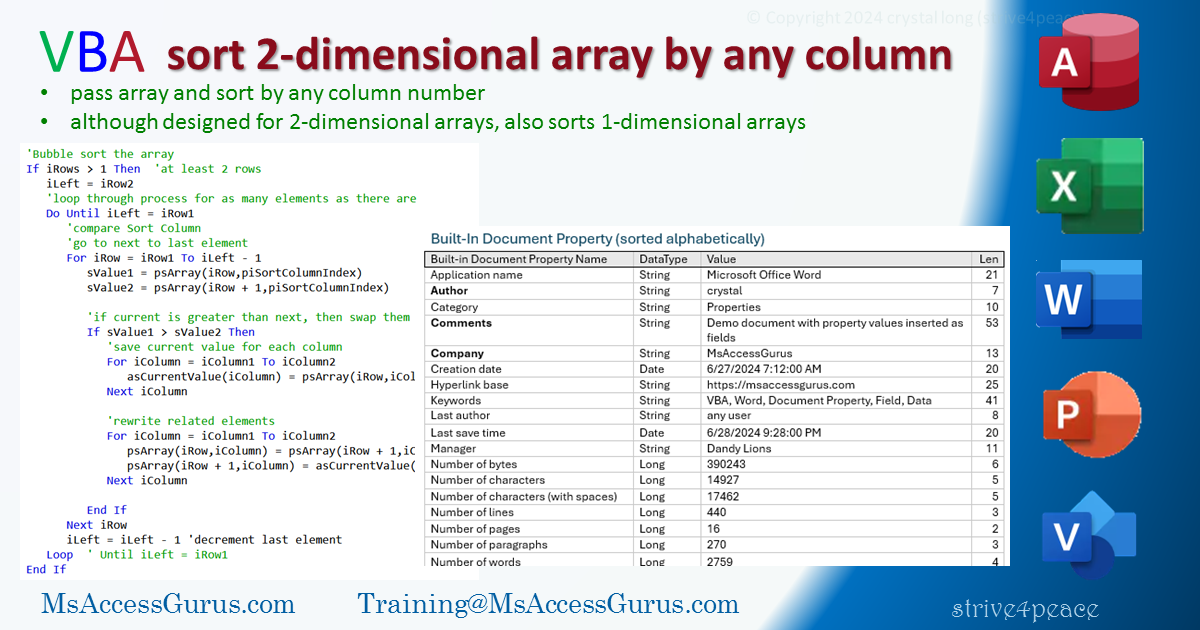
VBA
Standard module
Option Compare Text  'Ignore Case
Option Explicit  'variables must be declared

'*************** Code Start ***************************************************
' module: bas_Array_Sort_s4p
'
' Purpose  : Pass a string array you want to sort
'              -- it will be changed.
'              1- or 2-dimensional string array
'              Optionally, designate a column index to sort by
'              default column=0 and will be adjusted to lowest if not sent
'              Optionally, indicate descending order
' Author   : crystal (strive4peace)
' this code: https://msaccessgurus.com/VBA/Array_Sort2D.htm
' LICENSE  :
'   You may freely use and share this code, but not sell it.
'   Keep attribution. Mark your changes. Use at your own risk.
'------------------------
' PROCEDURES
'     Sort2DStringArray
'     BubbleSort
'------------------------
'     testBubbleSort
'     test2DSort
'     WriteBubbleArray2Debug
'     Write2DArray2Debug
'--------------------------------------------------------------------------------
'-------------------------------------------------------------------------------
'           Sort2DStringArray
'-------------------------------------------------------------------------------
Public Sub Sort2DStringArray(ByRef psArray() As String _
         ,Optional ByVal piSortColumnIndex As Integer = 0 _
         ,Optional ByVal pbDescending As Boolean = False _
               )
' Sort a 2-dimensional string array by specified column
'  based on bubble-sort code by Brent Spaulding
' 260906 UPDATED to specify descending sort pbDescending, bSwap,
' 240520 strive4peace,... 240714 stop if done,260820

   'PARAMETERs
   '  psArray -- string array you want to sort
   '             1 or 2 dimensions will be considered

   '  piSortColumnIndex is the column index (2nd dimension)
   '        in the array to sort by
   '        if not specified or lower, will be by the first column
   '        if higher than last, will be by the last column
   '  pbDescending is True for descending sort. Default=False

   On Error GoTo Proc_Err

   Dim asCurrentValue() As String

   ' pbDescending calculated True=Descending, False=Ascending (default)
   Dim iColumn As Integer _
      ,iColumn1 As Integer _
      ,iColumn2 As Integer _
      ,iRow As Integer _
      ,iRow1 As Integer _
      ,iRow2 As Integer _
      ,iRows As Integer _
      ,iLastRow As Integer _
      ,iCountSwap As Integer _
      ,sValue1 As String _
      ,sValue2 As String _
      ,bSwap As Boolean

   iRow1 = LBound(psArray,1)  'first row
   iRow2 = UBound(psArray,1)  'last row
   iRows = iRow2 - iRow1 + 1   'calculate number of rows

   iColumn1 = LBound(psArray,2)  'first column
   iColumn2 = UBound(psArray,2)  'last column

   iCountSwap = 0   'haven't swapped anything yet

   If piSortColumnIndex < iColumn1 Then
      'sort by first column if lower number specified
      'default is 0
      piSortColumnIndex = iColumn1
   End If
   If piSortColumnIndex > iColumn2 Then
      'sort by last column if higher number specified
      piSortColumnIndex = iColumn2
   End If

   'array with current values -- works with 1D arrays too
   ReDim asCurrentValue(iColumn1 To iColumn2)

   'Bubble sort the array if more than 1 row
   If iRows > 1 Then
      'set the last row to compare
      iLastRow = iRow2
      Do Until iLastRow = iRow1
         iCountSwap = 0  'no swaps yet for this pass

         'loop from first row to next to last row
         For iRow = iRow1 To iLastRow - 1
            'store current value and next value, in Sort Column
            sValue1 = psArray(iRow,piSortColumnIndex)
            sValue2 = psArray(iRow + 1,piSortColumnIndex)

            bSwap = False
            'is comparison ascending or descending?
            If pbDescending <> False Then  'True - descending
               If sValue1 < sValue2 Then
                  'sort descending
                  bSwap = True
               End If
            Else
               'ascending
               If sValue1 > sValue2 Then
                  bSwap = True
               End If
            End If

            'swap values
            If bSwap <> False Then
               'save current value for each column in array
               For iColumn = iColumn1 To iColumn2
                  asCurrentValue(iColumn) = psArray(iRow,iColumn)
               Next iColumn

               'swap value in each column
               For iColumn = iColumn1 To iColumn2
                  'assign current values to next row values
                  psArray(iRow,iColumn) = psArray(iRow + 1,iColumn)
                  'assign next row values to saved values
                  psArray(iRow + 1,iColumn) = asCurrentValue(iColumn)
               Next iColumn

               'count how many swaps made for this pass
               iCountSwap = iCountSwap + 1

            End If   'values swapped

         Next iRow

         'stop the loop if no swaps were made
         If Not iCountSwap > 0 Then
            'all done!
            Exit Do
         End If

         iLastRow = iLastRow - 1   'decrement last row
         iCountSwap = 0   'reset swap counter

      Loop    ' Until iLastRow = iRow1
   End If

Proc_Exit:
   Exit Sub

Proc_Err:
   MsgBox Err.Description _
       ,, "ERROR " & Err.Number _
        &  "   Sort2DStringArray"

   Resume Proc_Exit
   Resume
End Sub

'-------------------------------------------------------------------------------
'           BubbleSort -- simple example
'-------------------------------------------------------------------------------
Public Sub BubbleSort(ByRef psArray() As String _
         ,Optional ByVal pbDescending As Boolean = False _
   )
' 240714 strive4peace
' 260904 descending sort: pbDescending=True, bSwap
' Sort a single dimension string array
'  based on bubble-sort code originally written by Brent Spaulding

   ' PARAMETERS
   '   psArray -- string array to sort
   '   pbDescending = True to sort descending. Default=False=sort ascending

   On Error GoTo Proc_Err

   Dim iRow As Integer _
      ,iRow1 As Integer _
      ,iRow2 As Integer _
      ,iRows As Integer _
      ,iLastRow As Integer _
      ,iCountSwap As Integer _
      ,sValue1 As String _
      ,sValue2 As String _
      ,bSwap As Boolean

   iRow1 = LBound(psArray,1)  'first row
   iRow2 = UBound(psArray,1)  'last row
   iRows = iRow2 - iRow1 + 1  'calculate number of rows

   iCountSwap = 0  'haven't swapped anything yet

   'Bubble sort the array if more than 1 row
   If iRows > 1 Then
      'set the last row to compare
      iLastRow = iRow2
      'loop until last row is the first row
      Do Until iLastRow = iRow1

         'loop from first row to next to last row
         For iRow = iRow1 To iLastRow - 1
            'store current value and next value
            sValue1 = psArray(iRow)
            sValue2 = psArray(iRow + 1)

            bSwap = False
            'is comparison Ascending or Descending?
            If pbDescending <> False Then
               'sort descending
               'if current is less than next, then swap
               If sValue1 < sValue2 Then
                  bSwap = True
               End If
            Else
               'sort ascending
               'if current is greater than next, then swap
               If sValue1 > sValue2 Then
                  bSwap = True
               End If
            End If

            'swap values
            If bSwap <> False Then
               'save current value for each column in array
               'set current row value = next value
               psArray(iRow) = sValue2
               'set next value = saved current value
               psArray(iRow + 1) = sValue1
               'count how many swaps made for this pass
               iCountSwap = iCountSwap + 1
            End If

         Next iRow

         'stop the loop if no swaps were made
         If Not iCountSwap > 0 Then
            'all done!
            Exit Do
         End If

         iLastRow = iLastRow - 1  'decrement last row
         iCountSwap = 0  'reset swap counter

      Loop   ' Until iLastRow = iRow1
   End If

Proc_Exit:
   On Error GoTo 0  'reset
   Exit Sub

Proc_Err:
   MsgBox Err.Description _
       ,, "ERROR " & Err.Number _
        &  "   BubbleSort"

   Resume Proc_Exit
   Resume

End Sub

'-------------------------------------------------------------------------------
'           testBubbleSort
'-------------------------------------------------------------------------------
Sub testBubbleSort()
'270414 s4p, for testing, 260904 descending
'make an array with string values
' write the original values to the Debug (Immediate) window, Ctrl-G
' show how the array changes
' for Ascending and Descending sorting
   'CALLs
   '  BubbleSort
   '  WriteBubbleArray2Debug

   Dim asArray() As String
   'define test array by splitting a string at each comma
   asArray = Split( _
       "Title" _
      &  ",Subject" _
      &  ",Author" _
      &  ",Keywords" _
      &  ",Comments" _
      &  ",Last author" _
      &  ",Revision number" _
      &  ",Application name" _
      &  ",Manager" _
      &  ",Company" _
      , ",")

   Debug.Print  "INITAL ARRAY"
   Call WriteBubbleArray2Debug(asArray)

   'sort the array
   Call BubbleSort(asArray)

   Debug.Print  "SORTED ARRAY, Ascending"
   Call WriteBubbleArray2Debug(asArray)

   'sort the array in descending order
   Call BubbleSort(asArray,True)

   Debug.Print  "SORTED ARRAY, Descending"
   Call WriteBubbleArray2Debug(asArray)

End Sub

'-------------------------------------------------------------------------------
'           test2DSort
'-------------------------------------------------------------------------------
Sub test2DSort()
'260904 s4p, for testing
'make a 2-dimensional array with string values
' write the original values to the Debug (Immediate) window, Ctrl-G
' and show how the array changes
' depending on how it is sorted

   'CALLs
   '  Sort2DStringArray
   '  Write2DArray2Debug

   Dim asArray(1 To 5,1 To 3) As String
   'define test array
   'Name, species, age
   'Tweety and Sylvester first appeared together in 1947
   asArray(1,1) =  "Butch": asArray(1,2) =  "Dog": asArray(1,3) =  "07"
   asArray(2,1) =  "Midnight": asArray(2,2) =  "Cat": asArray(2,3) =  "15"
   asArray(3,1) =  "Tweety": asArray(3,2) =  "Bird": asArray(3,3) =  "85"
   asArray(4,1) =  "Fred": asArray(4,2) =  "Fish": asArray(4,3) =  "02"
   asArray(5,1) =  "Sylvester": asArray(5,2) =  "Cat": asArray(5,3) =  "79"

   Debug.Print  "INITAL ARRAY: Dim asArray(1 To 5, 1 To 3) As String"
   Call Write2DArray2Debug(asArray)

   'sort the array by first column
   Call Sort2DStringArray(asArray)

   Debug.Print  "Sort2DStringArray(asArray), 1st column Ascending"
   Call Write2DArray2Debug(asArray)

   'sort the array by 2nd column
   Call Sort2DStringArray(asArray,2)

   Debug.Print  "Sort2DStringArray(asArray, 2), 2nd column ascending"
   Debug.Print  "tie in sort column is then by the last sort"
   Call Write2DArray2Debug(asArray)

   'sort the array by 2nd column, descending
   Call Sort2DStringArray(asArray,2,True)

   Debug.Print  "Sort2DStringArray(asArray, 2, True), 2nd column descending"
   Debug.Print  "tie in sort column is broken by same initial Name sort"
   Call Write2DArray2Debug(asArray)

   'sort the array by first column, descending
   Call Sort2DStringArray(asArray,1,True)

   Debug.Print  "Sort2DStringArray(asArray, 1, True), 1st column Descending"
   Call Write2DArray2Debug(asArray)

   'sort the array by 3rd column in descending order
   Call Sort2DStringArray(asArray,3,True)

   Debug.Print  "Sort2DStringArray(asArray, 3, True), 3rd column descending"
   Call Write2DArray2Debug(asArray)

End Sub

'-------------------------------------------------------------------------------
'           WriteBubbleArray2Debug -- for testing
'-------------------------------------------------------------------------------
Public Sub WriteBubbleArray2Debug( _
   ByRef psArray() As String _
   ,Optional pbShowIndex As Boolean = True)
'270414 s4p, for testing,260905
' iterate the passed single dimension string array
' Write the array index and its values
'  to the debug (Immediate) window

   ' PARAMETERs
   '   psArray -- single dimension string array
   '  pbShowIndex = true to show element index

   Dim i As Integer

   Debug.Print String(25, "-")
   For i = LBound(psArray) To UBound(psArray)
      If pbShowIndex Then
         Debug.Print i; Tab(7);
      End If
      Debug.Print psArray(i)
   Next i
   Debug.Print String(25, "-")

End Sub

'-------------------------------------------------------------------------------
'           Write2DArray2Debug -- for testing
'-------------------------------------------------------------------------------
Public Sub Write2DArray2Debug( _
   ByRef psArray() As String _
   ,Optional pbShowIndex As Boolean = True)
'270414 s4p, for testing,260905
' iterate the passed 2-dimensional string array
' Write the array index and values for each column
'  to the debug (Immediate) window

   ' PARAMETERs
   '   psArray -- 2D string array (also work with 1D?)
   '  pbShowIndex = true to show element index in output

   Dim iRow As Integer _
      ,iCol As Integer _
      ,vString As Variant

   Debug.Print String(25, "-")
   For iRow = LBound(psArray) To UBound(psArray)
      vString = Null
      If pbShowIndex Then
         Debug.Print iRow; Tab(7);
      End If
      For iCol = LBound(psArray,2) To UBound(psArray,2)
         vString = (vString +  "; ") & psArray(iRow,iCol)
      Next iCol
      Debug.Print vString
   Next iRow
   Debug.Print String(25, "-")

End Sub
'*************** Code End *******************************************************
' Code was generated with colors using the free
Color Code add-in for Access