VBA
- code behind userform: uform_FindModule_s4p
- module: mod_UserForm_Launch_s4p
code behind userform: uform_FindModule_s4p
Option Explicit
Option Compare Text 'upper=lower case
'260906
'*************** Code Start *****************************************************
' code behind userform: uform_FindModule_s4p
'-------------------------------------------------------------------------------
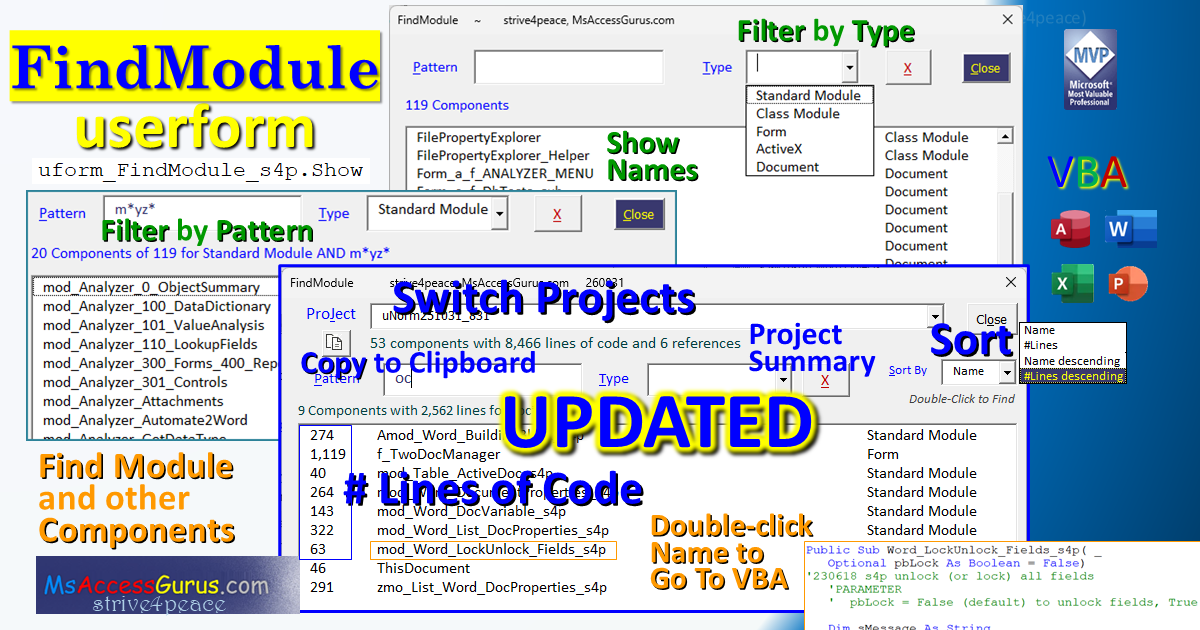
' Purpose : List components including module information
' for any open VBA project
' filter by:
' 1. pattern for Name with Wildcards
' 2. component Type
' Activate selected component in the VBE to see and edit
' Copy project and reference filenames to clipboard
' Sort list by Name or #Lines of code, Ascending or Descendin
' Choose Project from any that are open.
' See #Components, #References, Filename
' Author : crystal (strive4peace)
' This tool: https://msaccessgurus.com/tool/userform_FindModule_s4p.htm
' LICENSE :
' You may freely use and share this code, but not sell it.
' Keep attribution. Mark modifications. Use at your own risk.
'------------------------------------------------------------------------------
' CUSTOMIZE
' search this code for CUSTOMIZE to uncomment application specific code
'------------------------------------------------------------------------------
'------------------------------------------------------------------------------
' to Run!
'------------------------------------------------------------------------------
' 1. in the Project Explorer, select: uform_FindModule_s4p
' press F5 to Run!
' or from the menu, choose Run, Run Sub/UserForm
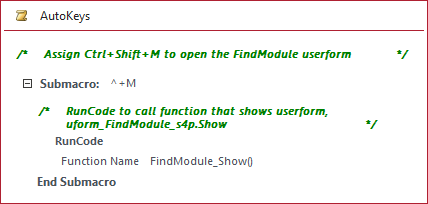
' OR 2. in VBA or Immediate window: uform_FindModule_s4p.Show
'------------------------------------------------------------------------------
' *** allow access to the VBA project
'-----------------------------------------------------------------------------
' Put file with code in a Trusted Location or enable it to run
' Excel, Word, PowerPoint
' File, Options, Trust Center, Trust Center Settings
' Trust Center, Macro Settings
' set: Trust access to the VBA project object model
' Access
' Computer\HKEY_CURRENT_USER\Software\Microsoft\Office\16.0\Access\Security.AccessVBOM = 1
'------------------------------------------------------------------------------
'------------------------------------------------------------------------------
' PROJECT array
' masProject(0 To mnCountProject, 1 To 6)
' header with labels is first row of data, BoundColumn=0
' 1. Name
' 2. Type - Host, StandAlone
' 3. #C VBComponents
' 4. #L Lines of code - calculated later
' 5. #R References
' 6. FileName
'
' COMPONENT array
' masComponent(1 To mnCountComponent, 1 To 5)
' BoundColumn = 2
' 1. CountOfLines
' 2. component .Name
' 3. GetComponentType
' 4. component .Type for crieria
' 5. CountOfLines for sorting
'------------------------------------------------------------------------------
' PROCEDURES
' UserForm_Initialize - set defaults, load projects and names
' UserForm_Terminate - release objects
'
' Load_Projects_List - once when form initializes
' cbo_Project_Change - trigger project change
' Load_Names_List - component names and info for project
' Write_Label_Project_Info - project info, update #L, do after Load_Names_List
' Write_Label_ModuleSummary - write each time list of names changes
' ~~ Criteria ~~
' cbo_Type_Change - filter names by Type
' txt_Pattern_Change - filter names by Pattern
' cmd_Clear_Click - clear criteria
' LoadMulti_Matches - show a subset of masComponent() for matches
' ~~ GoToModule ~~
' lst_Module_DblClick, GoToModule - activate chosen code in VBA
' ~~ Combos ~~
' cbo_Project_MouseUp - DropDown
' cbo_Type_MouseUp - DropDown
' cbo_Type_Enter - DropDown
' cbo_SortBy_MouseUp - DropDown
' cbo_SortBy_Enter - DropDown
' ~~ buttons ~~
' cmd_Close_Click - Unload Me
' cmd_CopyToClipboard_Click - copy project info to Clipboard
' ~~ private could be public ~~
' Sort2DStringArray - sort 2-dimensional array
' GetComponentType - get string type of component from number
' ClipboardSetText - put text on Windows Clipboard
'------------------------------------------------------------------------------
' Module declarations
'------------------------------------------------------------------------------
Private masComponent() As String 'Components
Private masProject() As String 'Projects
'----------------------------- pick Early or Late binding
'Early binding for development
' REFERENCE LIBRARY
' Microsoft Visual Basic for Applications Extensibility 5.3 Library
'Private moProject As VBProject
'Private moVBComponent As VBComponent
'Late binding to deploy
Private moProject As Object
Private moVBComponent As Object
'initialize
Private msApplicationName As String
Private mnCountProject As Long
'form specifications - Sort,
Private mnSortBy As Long '2=Name, 5=#Lines
Private msProject_Caption As String
Private msProject_Info As String
Private msActiveProjectName As String
Private mnActiveProject As Long
Private mbProtection As Boolean
Private mnCountComponent As Long
Private mnCountReferences As Long
Private mnProjectLines As Long '#lines of code in active project
Private mnMatchLines As Long '#lines of code in procedures that match
'------------------------------------------------------------------------------
' UserForm
'------------------------------------------------------------------------------
'~~~~~~~~~~~~~~~~~~ UserForm_Initialize
Private Sub UserForm_Initialize()
's4p ...251031ppt,1104Access,260828
'populate lst_Module listbox by assigning array to List property
'set default values
'load Type and SortBy combos
'show information for active project
'CALLs
' Load_Projects_List - this is the only time
' Load_Names_List - everytime a project changes
' Write_Label_Project_Info - everytime a project changes
On Error GoTo Proc_Err
Dim sMsg As String
Dim asType(1 To 5,1 To 2) As String
Dim asSortBy(1 To 4,1 To 2) As String
With Application
msApplicationName = .Name
mnCountProject = .VBE.VBProjects.Count
End With 'Application
mnSortBy = 2
'Type combo
asType(1,1) = 1: asType(1,2) = "Standard Module"
asType(2,1) = 2: asType(2,2) = "Class Module"
asType(3,1) = 3: asType(3,2) = "Form"
asType(4,1) = 11: asType(4,2) = "ActiveX"
asType(5,1) = 100: asType(5,2) = "Document"
'SortBy combo
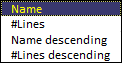
asSortBy(1,1) = 2: asSortBy(1,2) = "Name"
asSortBy(2,1) = 5: asSortBy(2,2) = "#Lines"
asSortBy(3,1) = -2: asSortBy(3,2) = "Name descending"
asSortBy(4,1) = -5: asSortBy(4,2) = "#Lines descending"
With Me
.txt_Pattern.Value = ""
With .cbo_Type
.List = asType
'.ListIndex = -1 'no value
End With
With .cbo_SortBy
.List = asSortBy
.Value = "2" 'default is Name
End With
End With
'Projects
Call Load_Projects_List 'masProject(),moProject,mnActiveProject
'Names
Call Load_Names_List
'do after Load names to get total number of code lines
Call Write_Label_Project_Info 'needs moProject, mnActiveProject
Proc_Exit:
Exit Sub
Proc_Err:
sMsg = "ERROR " & Err.Number & " in " & msApplicationName _
& vbCrLf & vbCrLf _
& Err.Description _
& vbCrLf & vbCrLf & sMsg
MsgBox sMsg,, " UserForm_Initialize : " & Me.Name
Resume Proc_Exit
Resume
End Sub
'~~~~~~~~~~~~~~~~~~ UserForm_Terminate
Private Sub UserForm_Terminate()
'241102,60820
Set moVBComponent = Nothing
Set moProject = Nothing
End Sub
' -------------------------------------------------------------------
' Load_Projects_List
' -------------------------------------------------------------------
Private Sub Load_Projects_List()
'260826,28,31
'cbo_Project
' BoundColumn = 0 = ListIndex
'
'SET
' mnActiveProject
' msActiveProjectName
' masProject()
' moProject
On Error GoTo Proc_Err
Dim sName As String _
,sMsg As String
Dim n As Long
Dim bProtection As Boolean
ReDim masProject(0 To mnCountProject,1 To 6) 'header row
'1. Name
'2. Type - Host, StandAlone
'3. #C VBComponents
'4. #L Lines of code - calculated later
'5. #R References
'6. FileName
' .Description
masProject(0,1) = "Name"
masProject(0,2) = "Type"
masProject(0,3) = "#C"
masProject(0,4) = "#L"
masProject(0,5) = "#R"
masProject(0,6) = "FileName"
n = 0
With Application.VBE
msActiveProjectName = .ActiveVBProject.Name
For Each moProject In .VBProjects
n = n + 1
With moProject
'1. Name
sName = .Name
masProject(n,1) = sName
'see if is active project
If sName = msActiveProjectName Then
'set index for active project
mnActiveProject = n
mbProtection = bProtection
End If
'1=vbext_pp_locked 0=vbext_pp_none
bProtection = .Protection
'2. Type
Select Case .Type
Case 100: masProject(n,2) = "Host" 'vbext_pt_HostProject
Case 101: masProject(n,2) = "Standalone" 'vbext_pt_StandAlone
Case Else: masProject(n,2) = .Type
End Select
'3. #C, 4. #L, 5. #R
If bProtection <> 0 Then
'vba Protection
masProject(n,4) = "X" '#L
Else
masProject(n,4) = "" '#L
masProject(n,3) = .VBComponents.Count '#C CStr
masProject(n,5) = .References.Count
End If
'6. Filename
On Error Resume Next
'error if file isn't saved
masProject(n,6) = .FileName
If Err.Number > 0 Then
masProject(n,6) = ""
On Error GoTo -1 'resume here
End If
On Error GoTo Proc_Err
End With 'moProject
Next moProject
End With 'Application.VBE
'populate the combobox
With Me.cbo_Project
.List = masProject
.Value = mnActiveProject 'active project index
End With
' If bProtection <> 0 Then
' 'vba Protection
' Set moProject = Nothing
' Else
'now set moProject to active project
Set moProject = Application.VBE.ActiveVBProject 'project running this code
' End If
Proc_Exit:
Exit Sub
Proc_Err:
sMsg = "ERROR " & Err.Number _
& " in " & msApplicationName _
& vbCrLf & vbCrLf _
& Err.Description _
& vbCrLf & vbCrLf & sMsg
MsgBox sMsg,, "Error Load_Projects_List : " & Me.Name
Resume Proc_Exit
Resume
End Sub
Private Sub cbo_Project_Change()
'260826,28
'SET
' mnActiveProject
' msActiveProjectName
'CALLS
' Load_Names_List
' Write_Label_Project_Info
With Me.cbo_Project
'exit if no value
' If .ListIndex = -1 Then Exit Sub
'ListBoxes cannot have a traditional header row
'Instead, the first line of data is for headers
'If the user clicks on the header row, it's ignored and
'the value is put back to what is saved.
If Not .ListIndex > 0 Then
'put value back
.Value = mnActiveProject
Exit Sub
End If
'exit if didn't change
If mnActiveProject = .Value Then Exit Sub
'set Active names
mnActiveProject = .Value
msActiveProjectName = .Column(0)
End With
'set moProject to selected
Set moProject = Application.VBE.VBProjects(mnActiveProject)
Call Load_Names_List
Call Write_Label_Project_Info
End Sub
' -------------------------------------------------------------------
' Load_Names_List
' -------------------------------------------------------------------
Private Sub Load_Names_List()
'260826 assumes moProject is set
'loop though Components, Store info in masComponent()
'USE
' moProject
'SET
' mnProjectLines
' mnCountComponent
' masComponent()
'UPDATE
' masProject()
'CALLs
' SortStringArray
' Write_Label_ModuleSummary
' LoadMulti_Matches
On Error GoTo Proc_Err
Dim sMsg As String _
,n As Long _
,nLinesModule As Long
mnCountComponent = moProject.VBComponents.Count
mnProjectLines = 0
If mnCountComponent > 0 Then
ReDim masComponent(1 To mnCountComponent,1 To 5)
Else
ReDim masComponent(1 To 1,1 To 5)
GoTo proc_ListBox
End If
'BoundColumn = 2, Name
'1. CountOfLines
'2. component .Name
'3. GetComponentType
'4. component .Type for crieria
'5. CountOfLines for sorting
' load names into array
n = 0
For Each moVBComponent In moProject.VBComponents
n = n + 1
With moVBComponent
nLinesModule = .CodeModule.CountOfLines
masComponent(n,1) = Format(nLinesModule, "#,###")
masComponent(n,2) = .Name
masComponent(n,3) = GetComponentType(.Type)
masComponent(n,4) = .Type
masComponent(n,5) = Format(nLinesModule, "000000")
mnProjectLines = mnProjectLines + nLinesModule
End With 'moVBComponent
Next moVBComponent
'update Project array for mnProjectLines
If masProject(mnActiveProject,4) = "" Then
masProject(mnActiveProject,4) _
= Format(mnProjectLines, "#,##0")
Me.cbo_Project.List = masProject 'show value
End If
' sort array
'if column is negative, sort descending order
Call Sort2DStringArray(masComponent _
,Abs(mnSortBy) _
,(mnSortBy < 0))
proc_ListBox:
With Me
If Not (.txt_Pattern.Value & "" <> "" _
Or .cbo_Type.ListIndex <> -1) Then
'no criteria
'assign Label_Module_List.Caption
Call Write_Label_ModuleSummary(mnCountComponent)
' populate listbox with results
With .lst_Module
'clear selection 'future: keep if still in list
.ListIndex = -1
'set List
.List = masComponent
End With
Else
Call LoadMulti_Matches
End If
End With 'me
Proc_Exit:
Exit Sub
Proc_Err:
sMsg = "ERROR " & Err.Number _
& " in " & msApplicationName _
& vbCrLf & vbCrLf _
& Err.Description _
& vbCrLf & vbCrLf & sMsg
MsgBox sMsg,, "Error Load_Names_List : " & Me.Name
Resume Proc_Exit
Resume
End Sub
Private Sub cbo_SortBy_Change()
'260826,904
Dim bDoSort As Boolean
bDoSort = False
With Me.cbo_SortBy
If IsNull(.Value) Then
.Value = "2"
mnSortBy = 2
bDoSort = True
Else
If mnSortBy <> CLng(.Value) Then
bDoSort = True
mnSortBy = .Value 'negative=descending
End If
End If
End With
If bDoSort <> False Then
' sort array
Call Sort2DStringArray(masComponent _
,Abs(mnSortBy) _
,(mnSortBy < 0))
Call Load_Names_List
End If
End Sub
'------------------------------------------------------------------------------
' information
'------------------------------------------------------------------------------
'~~~~~~~~~~~~~~~~~~ Write_Label_Project_Info
Private Sub Write_Label_Project_Info()
'write each time project changes
' Me.Label_Project_Info.Caption
' set msProject_Info
'260829 do after Load_Names_List for mnProjectLines,906
'SET
' msProject_Caption
' assign to Me.Label_Project_Info.Caption
' msProject_Info
' for copying to clipboard
'USE
' moProject, Application.VBE.ActiveVBProject then user change
' mnActiveProject
' mnCountComponent
' mnProjectLines
' masProject()
'CALLED BY
' UserForm_Initialize
' cbo_Project_Change
On Error GoTo Proc_Err
Dim oRef As Object 'VBIDE.Reference
Dim oAddin As Object 'AddIn
Dim oCOMAddIn As Object 'COMAddIn
Dim n As Long
Dim nNumber As Long
Dim s As String
Dim iTab As Integer
Dim sMsg As String
msProject_Info = ""
iTab = 3
With moProject
mnCountReferences = moProject.References.Count
'msProject_Caption
msProject_Caption = Format(mnCountComponent, "#,##0") _
& " component" _
& IIf(mnCountComponent <> 1, "s", "") _
& " with " _
& Format(mnProjectLines, "#,##0") _
& " lines of code and " _
& mnCountReferences _
& " references"
'show msProject_Caption
Me.Label_Project_Info.Caption = msProject_Caption
'----------------------------- msProject_Info
'
s = vbCrLf _
& "———— VB PROJECT *** " _
& msProject_Caption & " ————"
'Name
s = s & vbCrLf & space(iTab) _
& masProject(mnActiveProject,1)
'File
s = s _
& IIf(masProject(mnActiveProject,6) <> "" _
,vbCrLf & masProject(mnActiveProject,6) _
, "")
'References
s = s & vbCrLf _
& "—— " & mnCountReferences _
& " REFERENCES ——" _
For Each oRef In .References
With oRef
s = s & vbCrLf & space(iTab) _
& .Name & " — " _
& .FullPath
End With 'oRef
Next oRef
msProject_Info = msProject_Info & s
'COMPONENTS
If mnCountComponent > 0 Then
s = vbCrLf _
& "—— " & mnCountComponent & " COMPONENT" _
& IIf(mnCountComponent <> 1, "S", "") _
& " —— " _
& "Name (#Lines) Type"
'1. CountOfLines
'2. component .Name
'3. GetComponentType
For n = 1 To mnCountComponent
'however it is currently sorted
'Name (#Lines) Type
s = s & vbCrLf & space(iTab) _
& masComponent(n,2) _
& " (" & masComponent(n,1) & ") " _
& masComponent(n,3)
Next n 'Component
msProject_Info = msProject_Info & s
End If
End With 'moProject
'-----------------------------
s = ""
With Application
s = "—— " & msApplicationName & " Application ——"
'------------------------------------------- CUSTOMIZE
'-------------------- use ONE ---------
' Access
' nNumber = .VBE.Addins.Count
' If nNumber > 0 Then
' s = s & vbCrLf & space(iTab) & nNumber & " AddIn" _
' & IIf(nNumber <> 1, "s", "") & ": "
' For Each oAddin In .VBE.Addins
' With oAddin
' s = s & vbCrLf & .Name _
' & IIf(.Connect _
' , " (Connected) " _
' , " (Not onnected) ") _
' & .GUID
' End With 'oAddIn
' Next oAddin
' End If
'-------------------- OR
' Word, Excel, PowerPoint
' nNumber = .AddIns.Count
' If nNumber > 0 Then
' s = s & vbCrLf & space(iTab) & nNumber & " AddIn" _
' & IIf(nNumber <> 1, "s", "") & ": "
' For Each oAddin In .AddIns
' With oAddin
' s = s & vbCrLf & .Name _
' & IIf(.Installed _
, " (Installed)" _
, " (Not installed)") _
' & " — " & .Path
' End With 'oAddIn
' Next oAddin
' End If
'-------------------------------------------
nNumber = .COMAddIns.Count
If nNumber > 0 Then
s = s & vbCrLf & space(iTab) & nNumber & " COM AddIn" _
& IIf(nNumber <> 1, "s", "") & ": "
For Each oCOMAddIn In .COMAddIns
With oCOMAddIn
s = s & vbCrLf _
& .Description _
& IIf(.Connect _
, " (Connected) " _
, " (Not connected) ") _
& .GUID
End With 'oCOMAddIn
Next oCOMAddIn
End If
End With 'Application
msProject_Info = msProject_Info & vbCrLf & s & vbCrLf
Proc_Exit:
Set oAddin = Nothing
Set oCOMAddIn = Nothing
Set oRef = Nothing
Exit Sub
Proc_Err:
sMsg = "ERROR " & Err.Number & " in " & msApplicationName _
& vbCrLf & vbCrLf _
& Err.Description _
& vbCrLf & vbCrLf & sMsg
MsgBox sMsg,, " Write_Label_Project_Info : " & Me.Name
Resume Proc_Exit
Resume
End Sub
'~~~~~~~~~~~~~~~~~~ Write_Label_ModuleSummary
Private Sub Write_Label_ModuleSummary( _
pnNumberItems As Long _
,Optional psLabel As String = "" _
)
'write each time list of component names change
' Me.Label_Module_List.Caption
'241102,251030,260815,20,28,906
Dim sLabel As String
sLabel = Format(pnNumberItems _
, "#,###;;\N\o") _
& " Component" _
& IIf(pnNumberItems <> 1, "s", "")
If pnNumberItems <> mnCountComponent Then
sLabel = sLabel _
& " with " & Format(mnMatchLines, "#,##0") _
& " lines"
End If
If psLabel <> "" Then
sLabel = sLabel & " for " & psLabel
End If
Me.Label_Module_List.Caption = sLabel
End Sub
'------------------------------------------------------------------------------
' Criteria: Pattern, Type
'------------------------------------------------------------------------------
Private Sub cbo_Type_Change()
'260814
Call LoadMulti_Matches
End Sub
Private Sub txt_Pattern_Change()
'260820
Call LoadMulti_Matches
End Sub
'~~~~~~~~~~~~~~~~~~ cmd_Clear_Click
Private Sub cmd_Clear_Click()
'241103 s4p,260819
Me.txt_Pattern.Value = ""
Me.cbo_Type.ListIndex = -1
'assign combo list to an array
With Me.lst_Module
'set List
.List = masComponent
'clear selection
.ListIndex = -1
End With
'update label caption for count modules
Call Write_Label_ModuleSummary(UBound(masComponent))
'set focus to Pattern control
Me.txt_Pattern.SetFocus
End Sub
'~~~~~~~~~~~~~~~~~~ LoadMulti_Matches
Private Function LoadMulti_Matches() As Long
'241102...251031,260819,20..27,28,30
'run multiple times
' new array for list with module names that match
' pattern and type
' asMatchnames is array with masComponent matches
' nMatch rows, 3 columns (ListBox has 3 columns)
'CALL
' Write_Label_ModuleSummary
Dim nMatch As Long _
,n As Long _
,nType As Long _
,nTypeComp As Long _
,sName As String _
,sPattern As String _
,bCompare As Boolean _
,bMatch As Boolean _
,vLabel As Variant
Dim asMatchnames() As String
'for storing index numbers that match
Dim anMatchIndex() As Long
On Error GoTo Proc_Err
LoadMulti_Matches = 0 'nothing in list
mnMatchLines = 0 'number of procedure lines that match
vLabel = Null
'assume that we don't have to compare and get matches
bCompare = False
With Me.cbo_Type
If .ListIndex = -1 Then
nType = 0
Else
nType = .Value
bCompare = True
vLabel = .Column(1) '"Type: " &
End If
End With
With Me.txt_Pattern
sPattern = .Value & ""
If Not Len(sPattern) > 0 Then 'no pattern
If nType = 0 Then
With Me.lst_Module
'set List
.List = masComponent
'clear selection
.ListIndex = -1
End With
Call Write_Label_ModuleSummary(mnCountComponent)
'assign Label_Module_List.Caption
Call Write_Label_ModuleSummary(mnCountComponent)
Exit Function
End If
Else
'has a pattern
bCompare = True
If Not (InStr(sPattern, "*") > 0 _
Or InStr(sPattern, "?") > 0 _
Or InStr(sPattern, "#") > 0) _
Then
'if pattern doesn't have wilcards, add them
sPattern = "*" & sPattern & "*"
End If
vLabel = (vLabel + " AND ") _
& sPattern '" Pattern: " &
End If
End With
'get matches
If bCompare <> False Then 'bCompare is True
'array to store row number that matches
ReDim anMatchIndex(1 To mnCountComponent)
'loop array nMatch+ anMatchIndex(nMatch) = n
nMatch = 0
For n = 1 To mnCountComponent
sName = masComponent(n,2)
bMatch = True 'assume item will be included
If nType > 0 Then
nTypeComp = masComponent(n,4)
If nTypeComp <> nType Then
'no match for Type
bMatch = False
End If
End If
If bMatch <> False And _
(sPattern <> "" And Not sName Like sPattern) _
Then
'no match for Pattern or pattern invalid
PatternNoMatch:
bMatch = False
End If
If bMatch <> False Then
nMatch = nMatch + 1
anMatchIndex(nMatch) = n
End If
Next n
With Me.lst_Module
If nMatch > 0 Then
'loop and load matches to asMatchnames
ReDim asMatchnames(1 To nMatch,1 To 3)
'BoundColumn=2
'1. CountOfLines
'2. component .Name
'3. GetComponentType
'anMatchIndex is the row that matches in masComponent
For n = 1 To nMatch
asMatchnames(n,1) = masComponent(anMatchIndex(n),1)
asMatchnames(n,2) = masComponent(anMatchIndex(n),2)
asMatchnames(n,3) = masComponent(anMatchIndex(n),3)
mnMatchLines = mnMatchLines + CLng(asMatchnames(n,1))
Next n
'assign new list
.List = asMatchnames
'clear choice
.ListIndex = -1
Else
'clear listbox
Me.lst_Module.Clear
End If
End With
Else
nMatch = mnCountComponent
vLabel = ""
With Me.lst_Module
'set List
.List = masComponent
'clear selection
.ListIndex = -1
End With
End If
Call Write_Label_ModuleSummary(nMatch,CStr(vLabel))
LoadMulti_Matches = nMatch
Proc_Exit:
Exit Function
Proc_Err:
If Err.Number = 93 Then '93 Invalid pattern string
Resume PatternNoMatch
End If
MsgBox Err.Description _
,, "ERROR " & Err.Number _
& " LoadMulti_Matches"
Resume Proc_Exit
Resume
End Function
' -------------------------------------------------------------------
' GoToModule
' -------------------------------------------------------------------
'Private Sub lst_Module_AfterUpdate()
''260820 Goto module or component
'
'End Sub
Private Sub lst_Module_DblClick( _
ByVal Cancel As MSForms.ReturnBoolean)
'260826
Call GoToModule
End Sub
Private Function GoToModule() As Boolean
'241102,251031,260820,28
Dim sName As String _
,nType As Long
GoToModule = False
With Me.lst_Module
If .ListIndex = -1 Then Exit Function
sName = .Column(1) '260828
End With
'show module or component to view and edit
With moProject.VBComponents(sName)
nType = .Type
.Activate
If nType = 100 Then 'document (/form/report)
.CodeModule.CodePane.Show
End If
End With
GoToModule = True
End Function
'------------------------------------------------------------------------------
' Combos
'------------------------------------------------------------------------------
Private Sub cbo_Project_MouseUp( _
ByVal Button As Integer,ByVal Shift As Integer _
,ByVal X As Single,ByVal Y As Single)
On Error Resume Next
Me.cbo_Project.DropDown
End Sub
Private Sub cbo_Type_MouseUp( _
ByVal Button As Integer,ByVal Shift As Integer _
,ByVal X As Single,ByVal Y As Single)
'260819
On Error Resume Next
Me.cbo_Type.DropDown
End Sub
Private Sub cbo_Type_Enter()
'260819
On Error Resume Next
Me.cbo_Type.DropDown
End Sub
Private Sub cbo_SortBy_MouseUp( _
ByVal Button As Integer,ByVal Shift As Integer _
,ByVal X As Single,ByVal Y As Single)
'260819
On Error Resume Next
Me.cbo_SortBy.DropDown
End Sub
Private Sub cbo_SortBy_Enter()
'260819
On Error Resume Next
Me.cbo_SortBy.DropDown
End Sub
' -------------------------------------------------------------------
' Close
' -------------------------------------------------------------------
Private Sub cmd_Close_Click()
'240521
Unload Me
End Sub
'-------------------------------------------------------------------------------
' Sort2DStringArray
'-------------------------------------------------------------------------------
'this could be Public
Private Sub Sort2DStringArray(ByRef psArray() As String _
,Optional ByVal piSortColumnIndex As Integer = 0 _
,Optional ByVal pbDescending As Boolean = False _
)
' Sort a 2-dimensional string array by specified column
' based on bubble-sort code by Brent Spaulding
' 260906 UPDATED to specify descending sort pbDescending, bSwap,
' 240520 strive4peace,... 240714 stop if done,260820
'PARAMETERs
' psArray -- string array you want to sort
' 1 or 2 dimensions will be considered
' piSortColumnIndex is the column index (2nd dimension)
' in the array to sort by
' if not specified or lower, will be by the first column
' if higher than last, will be by the last column
' pbDescending is True for descending sort. Default=False
On Error GoTo Proc_Err
Dim asCurrentValue() As String
' pbDescending calculated True=Descending, False=Ascending (default)
Dim iColumn As Integer _
,iColumn1 As Integer _
,iColumn2 As Integer _
,iRow As Integer _
,iRow1 As Integer _
,iRow2 As Integer _
,iRows As Integer _
,iLastRow As Integer _
,iCountSwap As Integer _
,sValue1 As String _
,sValue2 As String _
,bSwap As Boolean
iRow1 = LBound(psArray,1) 'first row
iRow2 = UBound(psArray,1) 'last row
iRows = iRow2 - iRow1 + 1 'calculate number of rows
iColumn1 = LBound(psArray,2) 'first column
iColumn2 = UBound(psArray,2) 'last column
iCountSwap = 0 'haven't swapped anything yet
If piSortColumnIndex < iColumn1 Then
'sort by first column if lower number specified
'default is 0
piSortColumnIndex = iColumn1
End If
If piSortColumnIndex > iColumn2 Then
'sort by last column if higher number specified
piSortColumnIndex = iColumn2
End If
'array with current values -- works with 1D arrays too
ReDim asCurrentValue(iColumn1 To iColumn2)
'Bubble sort the array if more than 1 row
If iRows > 1 Then
'set the last row to compare
iLastRow = iRow2
Do Until iLastRow = iRow1
iCountSwap = 0 'no swaps yet for this pass
'loop from first row to next to last row
For iRow = iRow1 To iLastRow - 1
'store current value and next value, in Sort Column
sValue1 = psArray(iRow,piSortColumnIndex)
sValue2 = psArray(iRow + 1,piSortColumnIndex)
bSwap = False
'is comparison ascending or descending?
If pbDescending <> False Then 'True - descending
If sValue1 < sValue2 Then
'sort descending
bSwap = True
End If
Else
'ascending
If sValue1 > sValue2 Then
bSwap = True
End If
End If 'sort number
'swap values
If bSwap <> False Then
'save current value for each column in array
For iColumn = iColumn1 To iColumn2
asCurrentValue(iColumn) = psArray(iRow,iColumn)
Next iColumn
'swap value in each column
For iColumn = iColumn1 To iColumn2
'assign current values to next row values
psArray(iRow,iColumn) = psArray(iRow + 1,iColumn)
'assign next row values to saved values
psArray(iRow + 1,iColumn) = asCurrentValue(iColumn)
Next iColumn
'count how many swaps made for this pass
iCountSwap = iCountSwap + 1
End If 'values swapped
Next iRow
'stop the loop if no swaps were made
If Not iCountSwap > 0 Then
'all done!
Exit Do
End If
iLastRow = iLastRow - 1 'decrement last row
iCountSwap = 0 'reset swap counter
Loop ' Until iLastRow = iRow1
End If
Proc_Exit:
Exit Sub
Proc_Err:
MsgBox Err.Description _
,, "ERROR " & Err.Number _
& " Sort2DStringArray"
Resume Proc_Exit
Resume
End Sub
'-------------------------------------------------------------------------------
' GetComponentType
'-------------------------------------------------------------------------------
' Standard Standard module 1 vbext_ct_StdModule, acStandardModule
' Class Class module 2 vbext_ct_ClassModule, acClassModule
' Form Microsoft Form 3 vbext_ct_MSForm
' ActiveX ActiveX Designer 11 vbext_ct_ActiveXDesigner
' Document Document Module 100 vbext_ct_Document
'this could be Public
Private Function GetComponentType(nVBComponentType As Long) As String
'260813,20
Select Case nVBComponentType
Case 1: GetComponentType = "Standard Module"
Case 2: GetComponentType = "Class Module"
Case 3: GetComponentType = "Form"
Case 11: GetComponentType = "ActiveX"
Case 100: GetComponentType = "Document"
Case Else: GetComponentType = nVBComponentType
End Select
End Function
'-------------------------------------------------------------------------------
' Clipboard
'-------------------------------------------------------------------------------
Private Sub cmd_CopyToClipboard_Click()
'260828,29,31,904,6
'put filename on the clipboard
'CALL
' ClipboardSetText
'msProject_Info defined in Write_Label_Project_Info
'add on for active document
Dim s As String
Dim n As Long
'-----------------------------
'Loaded Projects - calculated here since #L can change
If mnCountProject > 1 Then
s = "—— " & mnCountProject & " Loaded Projects ——"
For n = 1 To UBound(masProject)
s = s & vbCrLf _
& masProject(n,1) _
& " (" _
& masProject(n,2) _
& ", " & masProject(n,3) & " Components" _
& ", " & masProject(n,5) & " References" _
& IIf(masProject(n,4) <> "" _
, ", " & masProject(n,4) & " Lines" _
, "") _
& ") " _
& masProject(n,6)
Next n
s = msProject_Info & s & vbCrLf
End If
'------------------ CUSTOMIZE
'COMMENT to skip, UNCOMMENT to RUN add on for active document
'more information depending on application
'WORD/POWERPOINT/EXCEL/ACCESS module: mod__GetActive_info_s4p
' s = s & GetActive_info_s4p()
'------------------
Call ClipboardSetText(s)
End Sub
'==============================================================================
' from module: mod_Clipboard_MSHTML_s4p
' full module is here:
' https://msaccessgurus.com/VBA/Clipboard_MSHTML.htm
' must use variants for this to work right
'-------------------------------------------------------------------------------
' LATE binding is used. for EARLY binding:
' Microsoft HTML Object Library ( MSHTML )
Private Sub ClipboardSetText(ByVal pvText As Variant)
'this could be Public
'240612 strive4peace
With CreateObject( "htmlfile") 'HTMLDocument
.parentWindow.clipboardData.setData "Text",pvText
End With
End Sub
'*************** Code End *****************************************************



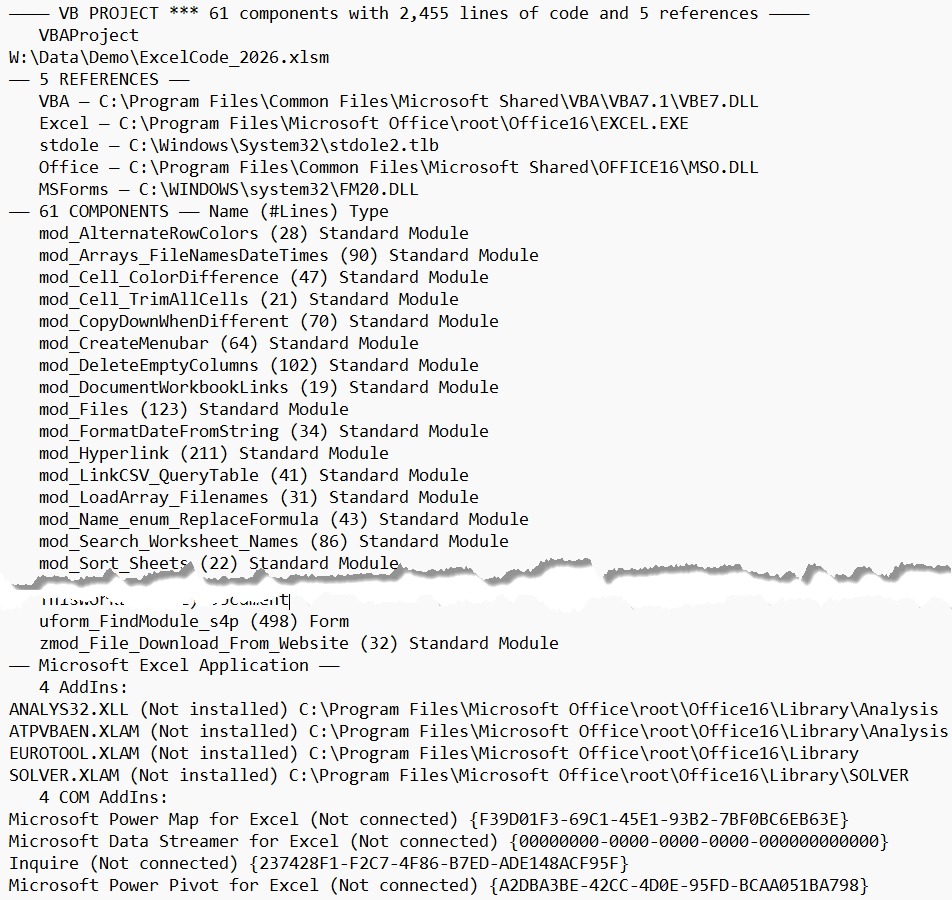
 Press Alt-C or click the Copy to Clipboard icon
to copy project information to the clipboard
for pasting somewhere else.
Name and Filename for
Project and each Reference, Addin, and COM Addin.
Number of components in the project and
Name, #Lines of code,
and Type for each.
Press Alt-C or click the Copy to Clipboard icon
to copy project information to the clipboard
for pasting somewhere else.
Name and Filename for
Project and each Reference, Addin, and COM Addin.
Number of components in the project and
Name, #Lines of code,
and Type for each.